


Staff finish more when lessons and quizzes meet them on the device they already use every shift. And certifications and onboarding stay clean when every employee gets the same training flow, deadlines, and quiz checks. Mobile delivery and one consistent path are the two levers that move completion the most.
Most training fails before the first quiz is ever opened. The lesson is too long. The manager sends it too late. The material is buried in a separate system. Nobody can tell who finished, who skipped, or who guessed their way through it. That is why a lot of companies buy employee training software and still end up chasing completion manually. The tool exists, but the training is not designed to fit real work.
The teams that get better results do something simpler. They make training short, mobile, role-based, and visible. They give new hires a clear path through the material. They use quick mobile quizzes to reinforce what matters. They keep the training process tied to onboarding software and everyday operations so staff do not have to jump between disconnected platforms. That is the lane Teamsly fits especially well, because lessons, quizzes, messaging, and the rest of team management already live in one place.
68%
higher training completion with due dates and mobile access
According to Teamsly training-page benchmarks, quiz participation improves 84% when lessons and scoring live in one structured workflow, and onboarding runs 42% faster when reusable content, progress visibility, and role-based paths are already built.
Why staff skip training in the first place
The issue is rarely motivation alone. It is usually format. When training is desktop-only, overly long, generic across roles, and detached from the workday, it becomes easy to postpone. That hurts more than compliance. It slows onboarding, weakens policy retention, and makes it harder to keep certifications consistent across teams or locations. A strong staff training app fixes those structural problems first.
That is why the real question is not just what content to teach. It is how to design training so people can actually finish it while working real shifts. Teamsly’s lessons and quizzes are useful here because they support mobile access, due dates, progress visibility, and multilingual delivery without forcing managers to build a separate learning operation around them.
01. Cut the lesson down
One topic per lesson. One practical outcome. If a new hire cannot finish it between tasks or before a shift, it is probably too long.
02. Use mobile quizzes
Turn key points into quick checks so staff prove understanding instead of just tapping through content.
03. Assign deadlines
Training gets done when it has a clear owner and a due date visible to both the employee and the manager.
04. Track progress live
Completion improves when managers can see who started, who finished, and where the bottlenecks are right away.
Build the training process around real work
If your training process only works in a quiet office, it does not really work for frontline teams. Staff need to be able to complete lessons on their phones, revisit materials quickly, and take short quizzes without breaking the rhythm of a shift. That is one reason Teamsly’s training feature matters: it lets managers assign lessons and quizzes from the same system they already use to manage the team.
That also changes accountability. Managers do not need to wonder whether training happened. They can assign it to one employee or a full team, set deadlines, watch completion status, and review scores in real time. The result is not just better completion. It is a cleaner training process that scales instead of getting rebuilt from scratch every time someone is hired.
How onboarding software and training should work together
Training gets completed more often when it is part of onboarding software, not a separate side project. A new hire should not have to guess what to do first, which lesson matters now, or who to ask if they fall behind. The path should be structured from day one. That is why the strongest companies connect training directly to role setup, onboarding milestones, and team expectations.
Teamsly fits that model because it can turn training into a repeatable part of new hire onboarding. Managers can reuse the same lessons and quizzes, assign them at the right stage, and track whether the employee is actually moving through the material. If you want the broader onboarding framework around that sequence, pair this article with the 30-60-90 onboarding checklist.
The best training does not feel like extra work. It feels like part of how the team learns to do the work right.
Training only becomes real when it is visible. Completion rises when staff can see what is assigned, managers can see what is done, and both sides can see what comes next. That is what a good staff training app changes. It removes ambiguity from the process.
Keep certifications and required learning consistent
Consistency is where many teams break down. One location trains thoroughly. Another location improvises. One manager remembers the certification deadline. Another assumes someone else handled it. A useful onboarding software and training system solves that by standardizing the path instead of leaving it to memory.
Teamsly helps here because the same lessons and quizzes can be assigned repeatedly across roles, teams, and locations. Due dates and progress tracking make it easier to keep required learning current. Spanish translation support also matters more than many teams expect. It lets companies keep one training workflow without duplicating the whole library for bilingual teams.
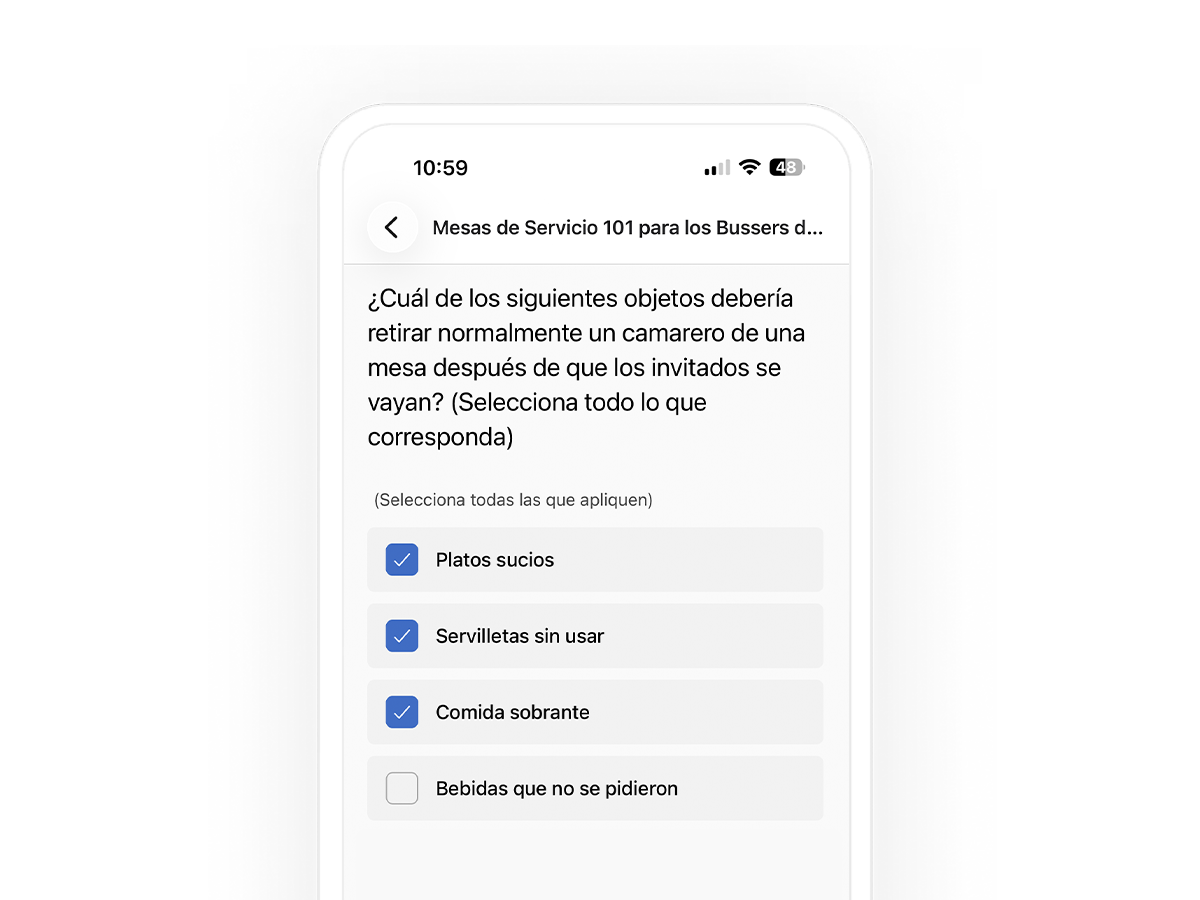
Training that translates to Spanish without extra setup
This is where Teamsly is genuinely different from bolting on a separate learning tool. When an employee uses the app in Spanish, the quizzes and lessons you already built appear in Spanish automatically — there is no second library to create and no duplicate content to maintain. New hires read questions in the language they think in, so they focus on learning the work instead of translating it, and you keep one training workflow for the whole team.
Frontline new hire
- Day 1: Core lesson.
- First 14 days: Role quiz.
- Recurring check: Refresher.
Supervisor
- Day 1: Policy set.
- First 14 days: Escalation quiz.
- Recurring check: Monthly check.
Compliance-required role
- Day 1: Certification intro.
- First 14 days: Score validation.
- Recurring check: Renewal path.
Why Teamsly is the employee training software teams actually need
Teamsly is not a generic learning platform dropped on top of a workplace. It is a team operations system that includes training, which matters because completion gets better when learning is connected to the rest of the workday. Managers can build mobile lessons, assign quick knowledge checks, track quiz performance, and keep training tied to the same environment employees already use for their shifts and updates.
Concretely, the Teamsly training feature gives you two building blocks that work together: lessons and quizzes. You can build unlimited custom courses from videos, documents, and your own material, then attach quizzes to confirm staff actually absorbed it. Each quiz can carry a due date and a training goal, scores are recorded automatically, and managers see completion status in real time — on mobile or desktop, for one person or a whole team. Because the lessons and quizzes are reusable, the same path can be assigned to every new hire instead of being rebuilt by hand each time.
That makes Teamsly a stronger employee training software choice for organizations that want less friction, clearer onboarding, and more consistent learning across teams. It also makes Teamsly a practical staff training app for frontline workforces, where desktop-heavy training usually underperforms. And because lessons, deadlines, and quiz assignments can be reused, Teamsly also functions as the kind of onboarding software that prevents managers from recreating the same training path every time someone joins.
For teams working on the broader people-ops system around that, this article also connects naturally to hiring hourly employees faster and handling no-shows with stronger accountability.
Frequently asked questions
What makes employee training software easier to complete?
Shorter lessons, mobile delivery, quick quiz checks, visible due dates, and manager-side progress tracking. Training completion improves when people know exactly what is assigned and can finish it in the flow of real work.
Why does a staff training app improve onboarding?
Because it removes guesswork from the new hire experience. Staff can access lessons on their phones, complete role-based quizzes, and move through a repeatable path instead of relying on whoever happens to be available to train them that day.
How can onboarding software keep certifications consistent?
By assigning the same lessons, quiz checkpoints, and deadlines to every relevant employee. Teamsly makes that easier by letting managers reuse content, track progress live, and support bilingual teams in one workflow.
Build training your staff will actually finish
Create mobile lessons, assign quizzes with due dates, track completion in real time, and keep onboarding and certification workflows consistent with Teamsly.